Auracast Transmitter for Church: Clear Wireless Sermon Audio
In modern worship spaces, the goal is to deliver sermons and musical content with clarity, reliability, and inclusivity. A well‑designed sound system can reach every corner of a sanctuary, but traditional wired setups and even some wireless configurations may fall short for congregations with diverse listening needs. Enter the Auracast transmitter for church—a dedicated broadcast solution built around Bluetooth LE Audio and the Auracast Broadcast Audio standard. This article explains what an auracast transmitter for church is, how it works, and how to plan, deploy, and maintain a system that delivers clear wireless sermon audio to all attendees.
What is Auracast and why it matters for churches
Auracast is a family of technologies designed to broadcast audio to many receivers simultaneously using Bluetooth LE Audio. The concept—often described as Auracast Broadcast Audio—enables a worship space to send a single audio mix to a multitude of listener devices without pairing each device individually. For churches, this means you can distribute the sermon, readings, or choir performances directly to smartphones, hearing aids, or dedicated receivers, with users opting in to listen whenever they need or want enhanced clarity.
Understanding Auracast Broadcast Audio
At its core, Auracast Broadcast Audio creates a low‑latency, synchronized audio stream that any compatible receiver can pick up. Important concepts include:
Low latency so the spoken word is synchronized with the presenter and visuals.
Simultaneous reception for large congregations—no crowds of individual Bluetooth connections.
Privacy and opt‑in—listeners choose to receive the broadcast on their device, preserving personal listening preferences.
Device versatility—receivers can be smartphones, hearing aids, or dedicated receivers with Auracast compatibility.
Who benefits from a church Auracast solution
Hearing‑impaired worshippers who rely on personal amplification to understand spoken word.
Visitors and multilingual congregations who may want translated overlays or clearer sermons.
Volunteer ushers and staff who need reliable, scalable sound distribution during events.
Broadcast and overflow rooms where a single feed can be heard without running separate wires.
How a dedicated Auracast transmitter for church works
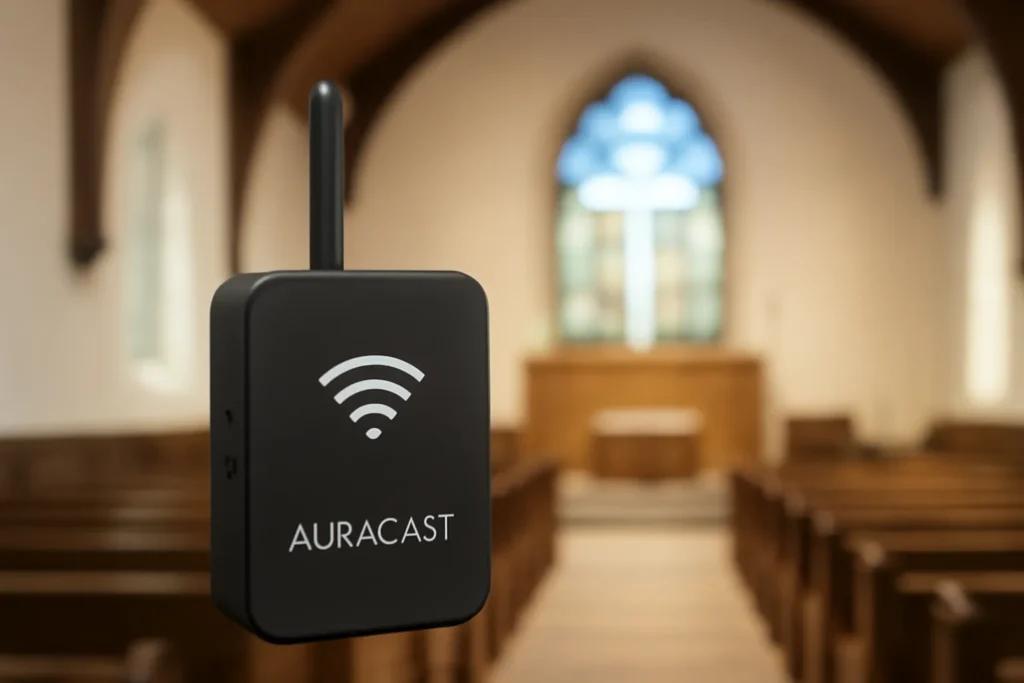
A purpose‑built auracast transmitter for church sits at the nexus between your main sound system and the audience’s listening devices. It receives the church’s master audio signal—typically the mix from the digital mixer or analog front end—and broadcasts it over the Auracast channel. The result is a clean, scalable audio distribution that doesn’t rely on direct device‑to‑device pairing.
Core components of an Auracast‑enabled church system
Auracast transmitter (the central broadcast device) that modulates and streams the audio feed.
Audio interface to connect the church’s mixing console or audio router to the transmitter (line level in, mic level options, or USB input).
Receiver devices for listeners (phones, hearing aids with Bluetooth compatibility, or dedicated Auracast receivers).
Power and mounting options—wall, ceiling, or tabletop mounting with appropriate power supply and ventilation.
Control and monitoring software—a web or local interface to configure broadcast channels, allowed devices, and security settings.
Connecting to existing church audio gear
The typical path is to take a direct line from the main mixing console or a dedicated stage monitor mix, then route that signal into the Auracast transmitter. In some setups, a small front‑of‑house processor or digital audio interface may be used to tailor the signal before broadcast—ensuring the broadcast feed preserves the word intelligibility and avoids feedback or noise.
For sermons and readings, latency should be minimized to keep audio in sync with the live performance and any projected lyrics or screen cues. Most Auracast implementations target latencies under 100 ms, with better configurations achieving even lower values. When planning, consider:
The venue size and seating layout (to determine if a single transmitter covers all areas or if multiple transmitters are needed).
Possible delays introduced by any audio processing in the console or signal chain.
Potential interference from other wireless equipment present in the building.
Benefits of adopting an Auracast transmitter for church environments
Implementing an auracast transmitter for church offers a range of tangible benefits beyond mere audio clarity.
Enhanced accessibility
Inclusive listening for people who use hearing aids or personal amplifiers.
Ability to deliver translations or sung/spoken word in a more intelligible way to multilingual congregations.
More flexible listening options
Worshippers can use their own devices without needing dedicated church receivers for every seat.
Overflow rooms or outdoor services can maintain a synchronized feed without extra wiring.
Operational efficiency and scalability
Reduce cable clutter and maintenance of multiple infrared or FM systems.
Centralized control simplifies updates and configurations across services.
Quality and consistency
Uniform coverage across the sanctuary improves speech intelligibility from front to back.
Consistent audio quality regardless of where a listener sits.
Choosing the right Auracast transmitter for your church
The market offers several options branded as auracast transmitters for church, each with different features, mounting options, and price points. When evaluating, look for capabilities that align with your sanctuary’s size, existing equipment, and budget.
Key features to compare
Coverage range—the maximum broadcast radius and whether multiple transmitters are needed for larger venues.
Latency specifications—lower latency is preferable to keep audio in sync with live action.
Channel management—ability to broadcast to a large number of listeners and to support multiple channels if needed (for example, one feed for main service and another for translators or sign language interpretation).
Compatibility—ensure devices that parishioners will use are supported (Android, iOS, hearing aids with Bluetooth, etc.).
Input options—line level, mic level, USB, or digital interfaces to accommodate your current mixer.
Security and privacy—encryption, access controls, and privacy settings to prevent unauthorized listening.
Ease of installation—how easily the transmitter integrates with your existing rack, mount, and cabling.
Power and environmental rating—power requirements and whether the unit is designed for the worship space’s conditions (temperature, dust, humidity).
Integration considerations
Existing audio chain compatibility—verify that your mixer’s output type (balanced XLR, TRS, AES/EBU, or USB) can feed the transmitter.
Future upgrades—choose a model that can upgrade firmware to support new Bluetooth profiles or updated codecs as Auracast evolves.
Warranty and service—consider long‑term support, calibration services, and replacement parts.
Setup guide: from planning to first service
A careful, staged deployment reduces risk and builds confidence in the system. Below is a practical roadmap to install an auracast transmitter for church in a typical sanctuary.
Survey seating areas to determine how many zones must be covered by broadcast.
Document the existing PA system, including mixer model, stage box, and main loudspeakers.
Identify preferred receivers (personal devices, hearing aids, or church‑provided receivers) and how listeners will enroll.
Installation steps
Mount the Auracast transmitter in a secure location near the sound rack or stage.
Connect the transmitter to the church’s audio chain using the appropriate line or mic input from the mixer or digital interface.
Power up the transmitter and verify the device scans for its configured channel(s).
Access the control interface to set up broadcast parameters (channel name, access controls, bass/treble adjustments, etc.).
Test with a pilot group of listeners: confirm intelligibility, latency, and device compatibility.
Document the deployment: keep a simple diagram of connections and a list of recommended receivers for new attendees.
Initial testing and service readiness
Run a test sermon with varied speech pace and acoustic content to evaluate clarity.
Check latency with projection cues and on‑screen lyrics to ensure synchronization.
Institute a listening sign‑up process and provide clear signage about the Auracast service.
Best practices for deployment in worship spaces
Adopting an Auracast solution is not only about hardware; it also involves thoughtful operational practices to maximize benefit.
Sound system integration and tuning
Balance the main mix so that the broadcast feed preserves speech intelligibility without overwhelming the musical elements.
Use a dedicated processing chain for the broadcast feed (EQ, compressor, noise gate) to minimize noise pickup and maintain consistency.
Align the transmitter level with the room’s acoustics to avoid feedback and clipping.
Listener onboarding and support
Provide simple instructions for attendees on how to enable listening on their devices.
Offer a short orientation during welcome or after‑service, highlighting privacy and how to switch between channels if available.
Assign volunteers to help with device pairing and troubleshooting during large events.
Maintenance and updates
Schedule periodic firmware updates for the transmitter and any associated receivers.
Test the system when there are major changes to the stage layout or venue renovation.
Record service conditions (volume levels, room temperature) to inform future adjustments.
Troubleshooting common issues with Auracast transmitters
Even well‑planned deployments can encounter hiccups. Here are common scenarios and practical fixes for an auracast transmitter for church setup.
Receiver devices cannot find the broadcast
Verify the transmitter is powered and broadcasting on the configured channel.
Check that listeners are using compatible Auracast receivers and that their devices have Bluetooth enabled for the auracast service.
Confirm there is no physical obstruction or aggressive RF interference in the area.
Latency feels late or out of sync
Review the signal chain for any processing delays and bypass nonessential processing during test runs.
Test with a direct line from the mixer to the transmitter to isolate latency sources.
Poor speech intelligibility in certain parts of the venue
Check for uneven coverage—consider adding a second transmitter or adjusting placement for better coverage.
Adjust EQ and filtering on the broadcast feed to reduce ambient noise and reverberation that muddy speech.
Use‑case scenarios: tailoring Auracast to different church sizes
Small to medium sanctuaries (under 300 seats)
A single compact Auracast transmitter may cover the entire space.
Ideal for accessible listening with personal devices or church‑supplied receivers.
Simple onboarding can be accomplished during welcome or after each service.
Large sanctuaries and campuses (500–1,000+ seats)
Consider a multi‑transmitter approach with zoned coverage to avoid dead spots.
Evaluate centralized control for consistent audio across zones and overflow rooms.
Plan for future expansion—additional channels or translators for multi‑lingual services.
Multi‑site church campuses
Use a unified broadcast feed across campuses to deliver the same sermon audio with local language overlays if needed.
Network considerations become critical—ensure reliable backhaul connections and synchronization between sites.
Security, privacy, and user experience with Auracast
A successful implementation respects user privacy and provides a secure, intuitive experience. Key factors include:
Opt‑in design—listeners actively choose to receive the broadcast on their device.
Access controls—administrative tools to approve or revoke devices, monitor usage, and prevent unwanted listening.
Data handling—avoid collecting personal data through the broadcast system; keep logs for maintenance and auditing as needed, never for marketing.
Interoperability—design for a broad range of devices while acknowledging that not all devices support Auracast yet.
For church leaders, the priority is to provide clear audio while preserving listener autonomy. The system should be designed so that a guest with a hearing impairment can easily participate without requiring staff intervention, and visitors can use devices they already own.
Budgeting, ROI, and long‑term value
Investing in an auracast transmitter for church is a strategic decision that can improve accessibility, reduce maintenance costs, and streamline operations over time.
Cost considerations
Initial purchase price for a broadcast transmitter and any required accessories (mounts, cables, adapters).
Possible multi‑transmitter kits for larger spaces, which may scale the cost but improve coverage.
Optional receivers or rental programs for visitors who don’t have compatible devices.
Ongoing maintenance, firmware updates, and potential service contracts.
Return on investment (ROI) considerations
Accessibility impact—better inclusivity can enhance worship experience and participation for a broader audience.
Operational efficiency—fewer wired adjustments for overflow rooms and events; easier service planning.
Future readiness—a future‑proofed system that can adapt to evolving listener devices and standards.
When presenting the project to church leadership, frame the conversation around mission impact, sustainability, and service quality, rather than purely on technology. A well‑communicated plan helps stakeholders understand the value of an auracast transmitter for church audiences and aligns the investment with the church’s outreach and discipleship goals.
Future‑proofing and scalability of a church Auracast system
The auracast transmitter for church is not a one‑time upgrade; it’s the foundation for a scalable listening program that can grow with your ministry. Consider these future‑proofing strategies:
Modular expansion—choose equipment that supports adding more transmitters or channels without a complete replacement.
Firmware and software updates—select vendors with a clear roadmap for Auracast features and security improvements.
Interoperability with accessibility tools—ensure compatibility with new hearing aid protocols, translation services, and language overlays as needed.
Networked deployment—for campuses, plan centralized monitoring with the option to synchronize across rooms or sites.
By thinking ahead, a church can evolve its wireless sermon audio system to support new listener technologies and service formats—without frequent, large capital projects. A well‑documented plan also helps with grant writing and donor communications by illustrating impact and long‑term stewardship.
Conclusion: embracing clear wireless sermon audio with Auracast
An auracast transmitter for church represents a meaningful convergence of accessibility, reliability, and scalability. By broadcasting a single, high‑quality sermon feed to a large audience through personal devices, churches can ensure that every listener—whether in the pew, in an overflow room, or joining from a different locale—receives the spoken word with crystal clarity. The approach described in this article emphasizes careful planning, thoughtful integration with existing audio systems, practical deployment steps, and ongoing maintenance. It also invites churches to consider inclusivity as a core value in worship technology.
If you are evaluating options, start with a needs assessment that considers sanctuary size, demographics, device availability, and budget. Then, consult with manufacturers or integrators who specialize in auracast broadcast audio solutions and request demonstrations or trial periods. With the right auracast transmitter for church, your congregation can experience sermons delivered with unprecedented intelligibility, accessibility, and reach—bringing your worship into a more connected, inclusive future.









Leave a Reply